Speaker Grouping
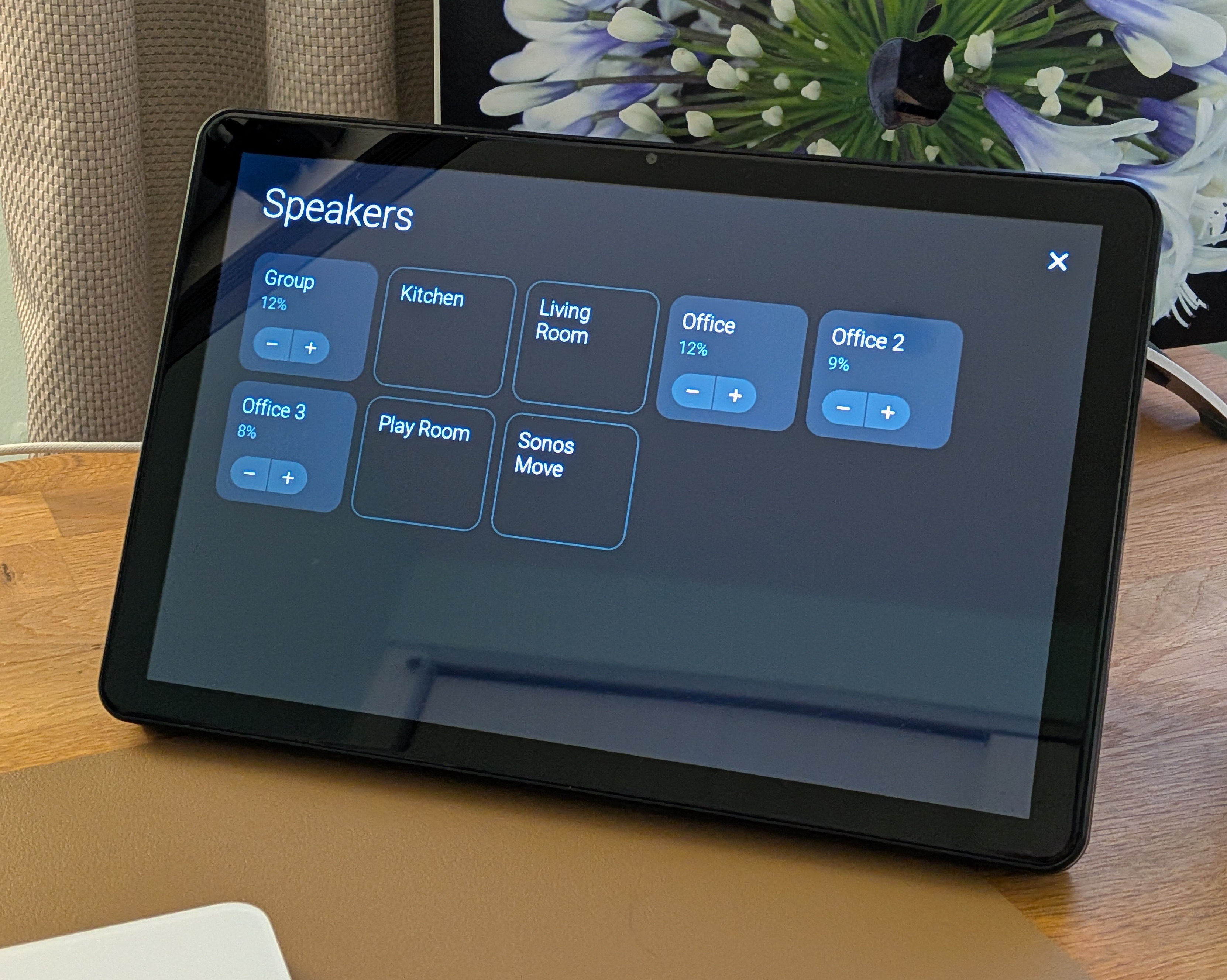
Control multi-room speaker groups directly from the touchscreen panel. The settings panel (swipe down) shows a speaker list on the right side where you can add or remove speakers from the group and adjust individual volumes.
How it works
- The panel auto-discovers all speakers from the configured integration in your Home Assistant instance
- The currently selected speaker is shown first
- The main volume adjusts all grouped speakers proportionally, keeping their relative balance
- Per-speaker
−/+buttons let you fine-tune individual volumes within the group - The toggle states update automatically when the group changes
Compatibility
This feature relies on Home Assistant's media_player.join and media_player.unjoin services. These are only available on speaker platforms that support grouping. If your speakers don't support these services, the grouping controls will not work.
| Platform | Supported | Integration name |
|---|---|---|
| Sonos | Yes | sonos |
| Google Cast | Yes | cast |
| HEOS (Denon/Marantz) | Yes | heos |
| Yamaha MusicCast | Yes | yamaha_musiccast |
| LinkPlay | Yes | linkplay |
| Bluesound | Yes | bluesound |
| Bang & Olufsen | Yes | bang_olufsen |
| Music Assistant | Experimental | music_assistant |
Setup the Speaker Group sensor
Add a template sensor to your Home Assistant configuration.yaml that discovers speakers from your integration. Choose the section below that matches your setup.
Standard integrations
For Sonos, Google Cast, HEOS, and other integrations listed in the compatibility table, add the following sensor, replacing sonos with the integration name from the table:
template:
  - sensor:
      - name: "Speaker Group"
        unique_id: speaker_group
        state: >
          {%- set s = integration_entities("sonos") | select("match", "media_player") | list -%}
          {{ s | count }}
        attributes:
          data: >
            {%- set s = integration_entities("sonos") | select("match", "media_player") | list -%}
            {{ s | map("replace", "media_player.", "") | join(",") }}|{{ s | map("state_attr", "friendly_name") | join(",") }}|{{ s | map("state_attr", "volume_level") | join(",") }}
You must restart Home Assistant in order for the new template to be loaded.
Music Assistant (Experimental)
WARNING
Music Assistant support is experimental. The template changed in MA 2.8 due to how players are now represented. Make sure you use the correct template for your version. If grouping does not work correctly with your player providers, please open an issue.
MA 2.8+
Music Assistant 2.8 merges players that support multiple protocols into a single entity, so group and sync-group filtering is no longer needed. The template below includes manufacturer information so the panel only shows speakers that can be grouped together (e.g. only Sonos speakers when a Sonos speaker is selected):
template:
  - sensor:
      - name: "Speaker Group"
        unique_id: speaker_group
        state: >
          {%- set s = integration_entities("music_assistant")
              | select("match", "media_player")
              | list -%}
          {{ s | count }}
        attributes:
          data: >
            {%- set s = integration_entities("music_assistant")
                | select("match", "media_player")
                | list -%}
            {%- set ns = namespace(mfrs=[]) -%}
            {%- for p in s -%}
              {%- set ns.mfrs = ns.mfrs + [device_attr(device_id(p), 'manufacturer') | default('unknown', true)] -%}
            {%- endfor -%}
            {{ s | map("replace", "media_player.", "") | join(",") }}|{{ s | map("state_attr", "friendly_name") | join(",") }}|{{ s | map("state_attr", "volume_level") | join(",") }}|{{ ns.mfrs | join(",") }}
MA 2.7 and earlier
Older versions of Music Assistant create separate group and sync-group entities alongside individual players. The reject filters below exclude these so only physical speakers appear in the panel:
template:
  - sensor:
      - name: "Speaker Group"
        unique_id: speaker_group
        state: >
          {%- set s = integration_entities("music_assistant")
              | select("match", "media_player")
              | reject("is_state_attr", "mass_player_type", "group")
              | reject("is_state_attr", "mass_player_type", "sync_group")
              | list -%}
          {{ s | count }}
        attributes:
          data: >
            {%- set s = integration_entities("music_assistant")
                | select("match", "media_player")
                | reject("is_state_attr", "mass_player_type", "group")
                | reject("is_state_attr", "mass_player_type", "sync_group")
                | list -%}
            {%- set ns = namespace(mfrs=[]) -%}
            {%- for p in s -%}
              {%- set ns.mfrs = ns.mfrs + [device_attr(device_id(p), 'manufacturer') | default('unknown', true)] -%}
            {%- endfor -%}
            {{ s | map("replace", "media_player.", "") | join(",") }}|{{ s | map("state_attr", "friendly_name") | join(",") }}|{{ s | map("state_attr", "volume_level") | join(",") }}|{{ ns.mfrs | join(",") }}
Verify the sensor
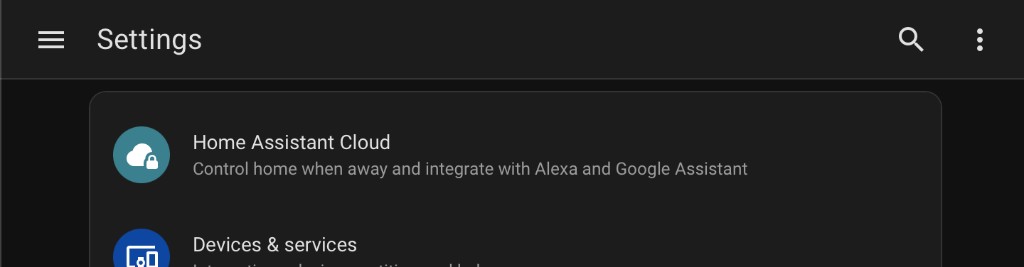
Verify the template sensor exists in Home Assistant by going to Settings, clicking the search icon (top right corner):
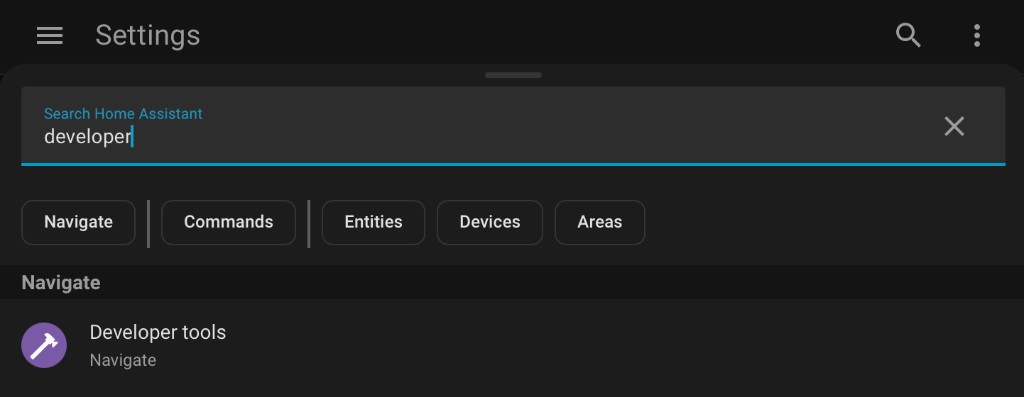
Search for Developer Tools and open it:
Select the States tab and search for sensor.speaker_group:
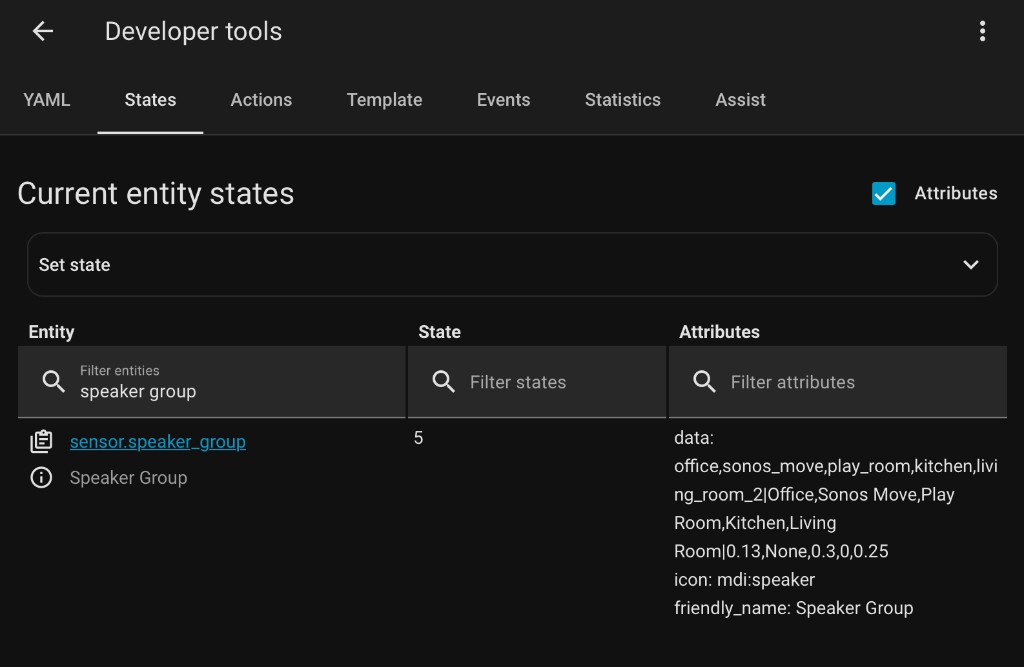
You should see a list of your speakers and their volume levels if it's working.
If the sensor doesn't appear or shows no data:
- Restart Home Assistant to load the new template.
- Make sure you added the template to
configuration.yaml.
Behavior
- The speaker list appears in the settings panel (swipe down) when there are at least two speakers from the configured integration
- If you don't have groups configured, you will just see the large single volume control.
