
7-inch JC1060P470 V2
The V2 / new panel has a V2 marking on the case. If you need to confirm it, disconnect power and remove the back. A screen-board date code of 2622 or higher identifies V2.
Match the firmware to the panel
The wrong profile leaves a white screen with a vertical noise band. Reflash the matching profile over USB to recover.
If chip information reports ESP32-P4 v3.1–v3.99 production silicon, use the V3 guide before applying case-date rules.
Install
Connect the display to your computer with a USB-C data cable plugged into the port shown below, then install.
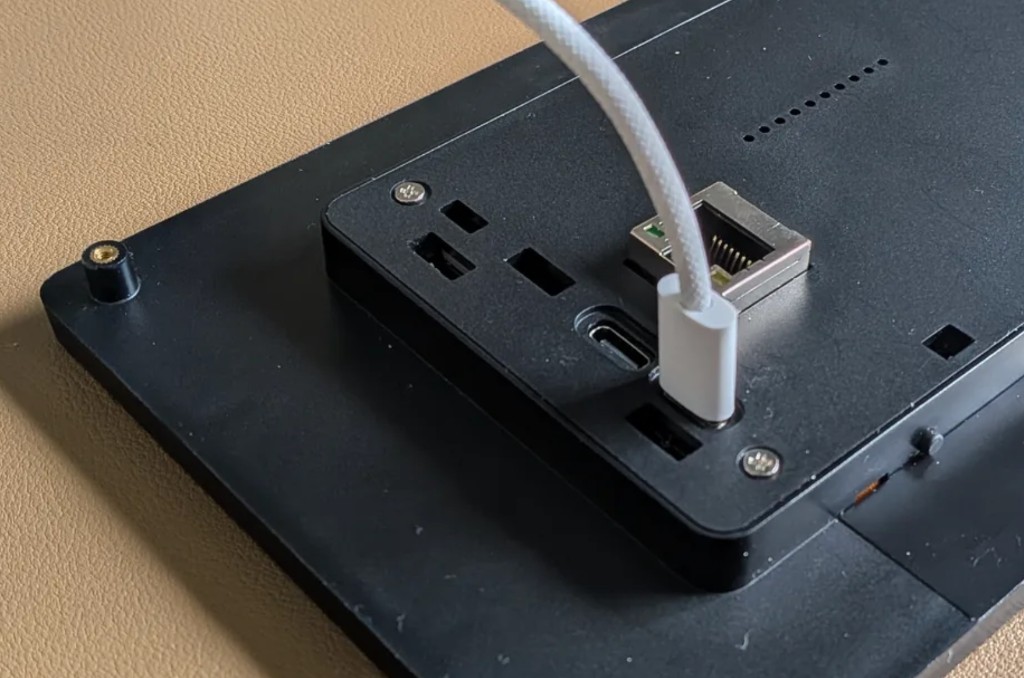
For WiFi setup and Home Assistant pairing, follow the Install guide.
ESPHome Manual Setup
substitutions:
  name: "office-screen"
  friendly_name: "Office Screen"

wifi:
  ssid: !secret wifi_ssid
  password: !secret wifi_password

packages:
  setup:
    url: https://github.com/jtenniswood/espcontrol/
    file: devices/guition-esp32-p4-jc1060p470-v2/packages.yaml
    refresh: 1sec
Advanced Ethernet option
For a V2 Ethernet model, use this package with the Ethernet substitutions:
substitutions:
  name: "office-screen"
  friendly_name: "Office Screen"
  network_transport: ethernet
  disable_updates: "true"

packages:
  setup:
    url: https://github.com/jtenniswood/espcontrol/
    file: devices/guition-esp32-p4-jc1060p470-v2/packages.yaml
    refresh: 1sec
This Ethernet option is for advanced manual installs only. It builds an Ethernet-only firmware: WiFi, captive portal, the WiFi setup hotspot, and Bluetooth proxy are not included, and the ESP32-C6 hosted WiFi/Bluetooth co-processor is kept off. The Ethernet build also uses a higher backlight PWM frequency on this panel, which avoids the shimmer seen during hardware testing with wired networking enabled. The disable_updates: "true" substitution removes EspControl's GitHub firmware update checker and update controls, while leaving ESPHome OTA available for manual installs.
Use USB when switching a display between the WiFi and Ethernet firmware variants. OTA updates can fail during that change because the network transport changes.
For the full manual setup notes, see Manual Setup.