
Weather
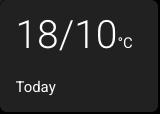
A weather card displays weather information from a Home Assistant weather entity. It can show either the current condition, such as Sunny, Cloudy, or Rainy, or the high / low temperatures for today or tomorrow, such as 18/10°C.
Weather cards are read-only — tapping them does nothing.
Setting Up a Weather Card
- Select a card and change its type to Weather.
- Enter a Weather Entity — the Home Assistant weather entity ID you want to display, for example
weather.forecast_home. - Choose Display:
- Current Conditions shows the live weather condition icon and label.
- Temperatures Today shows today's high / low temperature.
- Temperatures Tomorrow shows tomorrow's high / low temperature.
- For temperature displays, optionally enter a Label to override the default card label.
- On a Large card, turn on Large Temperature Numbers if you want the high / low reading scaled much larger.
How It Works on the Panel
- In Current Conditions mode, the card watches the weather entity's current state.
- In Current Conditions mode, the icon uses the normalized weather condition, while the label keeps provider-specific text from Home Assistant (for example,
light rainis shown as Light Rain rather than being reduced to Rainy). - In Temperatures Today and Temperatures Tomorrow modes, the card asks Home Assistant for the daily forecast for the configured weather entity.
- In temperature modes, the unit label comes from the panel's Temperature Unit setting.
- In temperature modes, the card label defaults to Today or Tomorrow, unless you set your own label.
- If Home Assistant reports
unknown,unavailable, or an unexpected current condition, the card shows a fallback weather icon and a readable label. - If the requested forecast is missing or unavailable, the card shows --/-- instead of leaving the card blank.
- The card uses the fixed tertiary background colour, like Sensor, Date, Clock, and World Clock cards.
Home Assistant actions permission
The temperature displays need the same Allow the device to perform Home Assistant actions setting as control cards. EspControl uses that permission to request forecast data from Home Assistant.
Temperatures Tomorrow
To show tomorrow's forecast high and low, create a Weather card and set Display to Temperatures Tomorrow. Enable Home Assistant actions so the panel can request the forecast.
Older configurations containing a separate Weather Forecast card load as a Weather card with this setting. You do not need to recreate them.
Supported Conditions
| Home Assistant state | What the card shows |
|---|---|
sunny | Sunny |
clear-night | Clear night |
partlycloudy | Partly cloudy |
cloudy | Cloudy |
fog | Fog |
hail | Hail |
lightning | Lightning |
lightning-rainy | Lightning and rain |
pouring | Pouring |
rainy | Rainy |
snowy | Snowy |
snowy-rainy | Snowy and rain |
windy | Windy |
windy-variant | Windy and cloudy |
exceptional | Exceptional |
unknown | Unknown |
unavailable | Unavailable |